
Understand Their Learning.
Plan What Comes Next.
KinderPath Pro brings assessment, instructional planning, progress monitoring, and reporting together so early-childhood educators can spend less time piecing together information and more time supporting children.
- 128 skills
- 12 domains
- 300+ teacher-led lessons
- Aligned to Georgia GELDS
How it works
From assessment to instruction, in one connected path.
KinderPath Pro helps educators move from understanding what a child knows to deciding what to teach next, while keeping progress and documentation connected.
01 · Assess
Capture where children are
Record School Readiness assessments, quick skill checks, and classroom observations as part of everyday practice.
02 · Understand
See development clearly
Results are organized by developmental domain and individual skill, so patterns are easier to read.
03 · Plan
Organize purposeful instruction
Use what you know about shared learning needs to build small groups around a focus skill.
04 · Teach
Connect needs to lessons
Move from an identified skill need to guided learning experiences in the Lesson Library.
05 · Monitor
Follow change over time
Document observations, reassess skills, and keep a dated record of how learning develops.
06 · Report
Communicate growth
Turn assessment and progress information into printable reports for educators, administrators, and families.
The student view
See the whole child, not just a score.
Assessment results, skill development, observations and learning evidence come together in one profile.
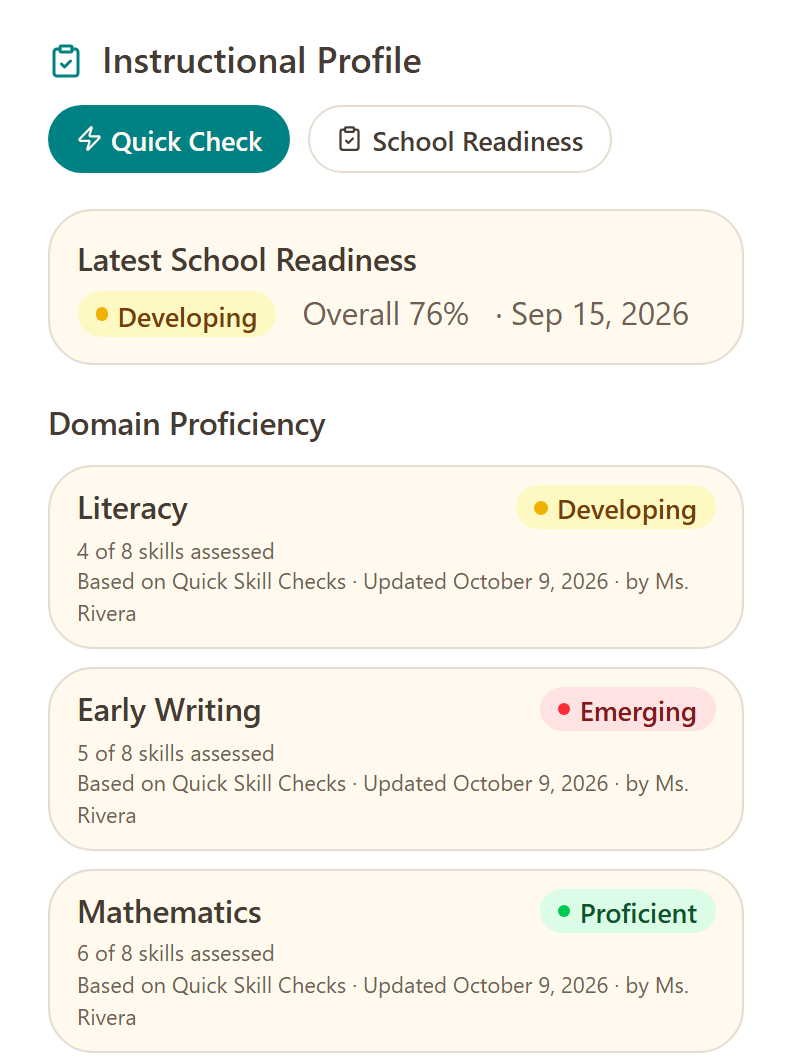
School Readiness results. Domain-level achievement levels from the readiness assessment, with a narrative readiness report.
Domain & skill proficiency. Emerging, Developing and Proficient across all developmental domains and their skills.
Instructional profile. A working view of current strengths and instructional needs, organized by domain.
Assessment history. A chronological record of every assessment, with date, assessor and type.
Observations & evidence. Teacher notes and student evidence (photos, files or audio) attached to what was observed.
Student Portfolio. A library of a child’s photos, files, recordings and saved reports, with a printable export.
Small-group instruction
Turn what you know into what you teach.
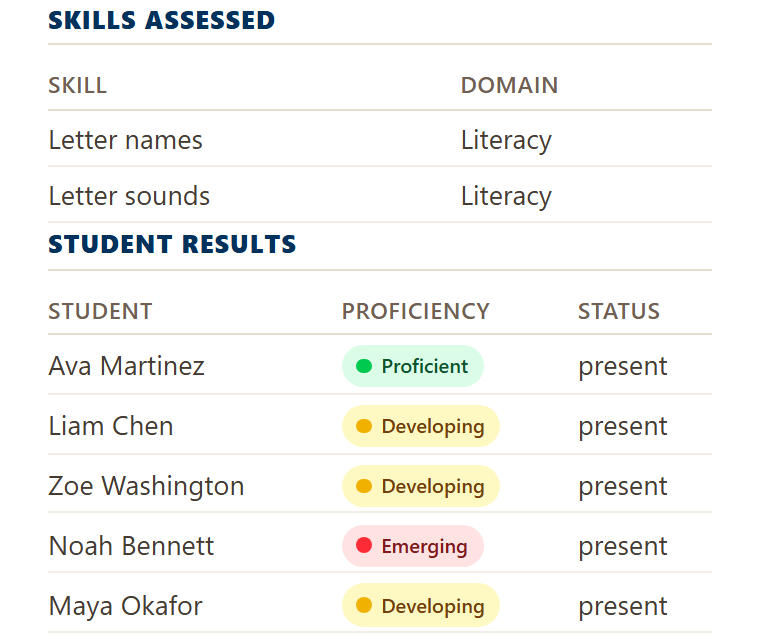
Identify shared learning needs, organize a small group around a focus skill, then record what you observe. Groups are always the teacher’s decision.
KinderPath Pro organizes the information; educators decide who learns together.

Instruction
From insight to instruction.
Over 300 teacher-led lessons connect each skill to practical guidance: a goal, materials, guided steps and a quick check. They are written for the educator, not as child-facing screen activities.
Introduce the skill. Open it with a clear, purposeful activity the educator facilitates.
Build the skill. Give children guided repetition and hands-on practice.
Use the skill. Move it into a meaningful context where children apply what they’ve learned.
Documentation & progress
Capture growth as it happens.
Early learning is documented in the moment. KinderPath Pro supports authentic observation and purposeful assessment inside everyday classroom practice, not constant testing.
Quick Skill Checks. Record proficiency for one child or a whole group across skills and domains in a single check.
Notes & evidence. Add teacher notes and attach photo, file or audio evidence to document authentic learning.
Progress over time. Growth views show how a skill has changed since it was first recorded.
Reporting
Turn classroom information into something useful.
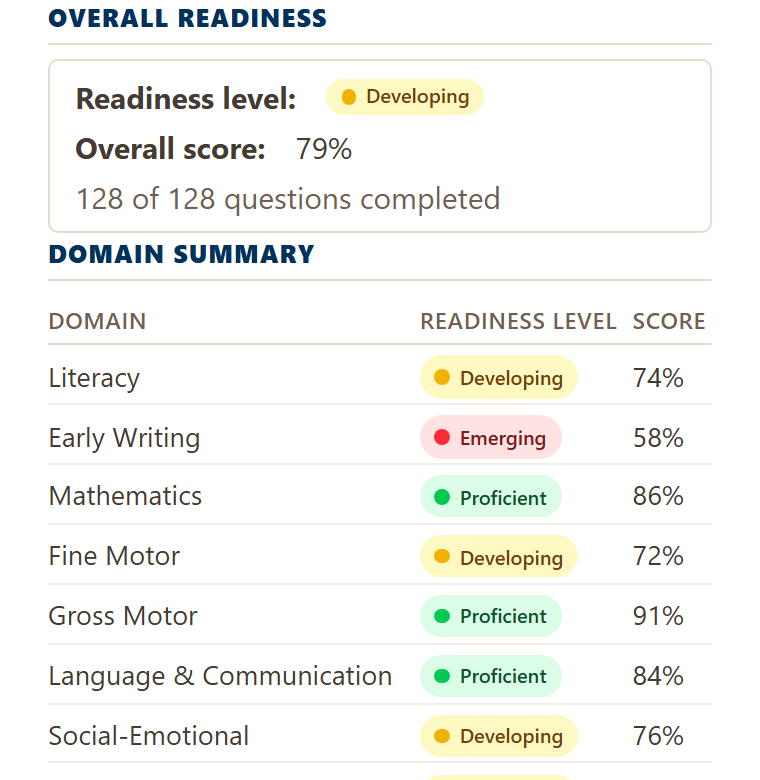
Every report is print-ready, so growth is easy to share.
- Student reports: weekly progress, growth, school readiness, domain and skill
- Classroom reports: progress, small groups, quick skill checks and history
- School-wide readiness with classroom drill-down
Roles
Built for the people supporting the classroom.
Teachers and administrators each get the view their work requires, inside one connected platform.

Teachers
- Understand each student's instructional needs
- Organize purposeful small groups
- Open guided lessons from the Lesson Library
- Document observations and evidence
- Monitor skill development over time
- Review student progress and portfolios
School Administrators
- Oversee classrooms across the school
- Invite and manage teachers and staff
- Monitor assessment activity
- Access school-level reporting and insights
- Manage school settings and enrollment
- Manage licensing and subscription
Whole-child learning
One platform. The whole child.
Early learning is more than literacy and mathematics. 128 skills across 12 domains help educators view development in every area of early childhood, so instruction reflects the whole child.
- Literacy
- Early Writing
- Mathematics
- Fine Motor
- Gross Motor
- Language & Communication
- Social-Emotional
- Executive Function
- Independence
- Science
- Social Studies
- Creative Arts

Student data and privacy
How we protect student information.
Young children’s records call for care. Here’s how KinderPath Pro handles them.
Read the Privacy PolicyYour school's records stay your school's. KinderPath does not claim ownership of student records and uses them only to provide the service to your school.
Never sold, never used for advertising. Student information is never sold, used for advertising, or used to train AI models.
Photos and audio stay private. Evidence files are stored privately and can't be opened without signing in. Photographs and audio are never sent to AI.
Stored in the United States. Student data is stored in the United States.
Your data, whenever you need it. A school can export all of its data at any time, and deletion requests are reviewed and logged.
Designed with Pre-K educators. Built for real classrooms.
School licensing
Bring KinderPath Pro to your school.
Choose a plan based on your school's enrollment and give your educators one connected place for assessment, instructional planning, progress monitoring, and reporting.
Multi-site or district? Contact KinderPath